
📑 Quick Navigation
Complete UPI Guide 2026: 7 Essential Things You Must Know About India's Payment Revolution
Master the Unified Payments Interface with this comprehensive guide - from basics to advanced security features
What is UPI? Understanding India's #1 Payment System in 3 Simple Steps
Imagine sending money as easily as sending a text message. That's exactly what UPI (Unified Payments Interface) has made possible for over 300 million Indians. Launched by the National Payments Corporation of India (NPCI) in 2016, UPI has transformed how we think about money transfers.
Think of UPI like WhatsApp for Money
Just like WhatsApp connects different phone numbers across any device, UPI connects different bank accounts across any app. You don't need separate apps for separate banks - one UPI app works with all your accounts!
The 3 Core Components That Make UPI Work
Virtual Payment Address (VPA)
Your unique UPI ID (like yourname@paytm) that replaces lengthy bank account numbers. It's like having an email address for your bank account - simple, memorable, and secure.
UPI PIN
Your 4-6 digit secret code that authorizes transactions. Think of it as your digital signature - only you know it, and it stays on your device, never shared with merchants.
PSP (Payment Service Provider) Apps
Apps like PhonePe, Google Pay, and Paytm that provide the interface. They're like different web browsers - all access the same internet (banking system) but offer unique features.
The beauty of UPI lies in its interoperability. You can send money from Google Pay to someone using PhonePe, just like emailing from Gmail to Yahoo. No restrictions, no boundaries - just seamless transfers.
How UPI Works: 5-Step Journey of Your Money (Behind The Scenes)
Ever wondered what happens in those 2-3 seconds between clicking "Pay" and seeing "Transaction Successful"? Let's decode the fascinating journey your money takes through the digital highways of India's banking infrastructure.
Initiation: You Enter UPI PIN
When you enter your UPI PIN, your app creates an encrypted payment request. This encryption is military-grade (AES-256) - the same technology banks use for online banking. Your PIN never leaves your device!
Authentication: PSP Verifies Your Identity
Your Payment Service Provider checks three things simultaneously: Is your UPI PIN correct? Do you have sufficient balance? Is this transaction pattern normal for you? This triple-check happens in milliseconds.
Routing: NPCI Acts as Traffic Controller
NPCI's servers receive your request and route it to the recipient's bank. Think of NPCI as India's payment highway system - it ensures your money reaches the right destination through the fastest route.
Settlement: Banks Exchange Money
Your bank debits your account and credits the recipient's bank through the Reserve Bank of India's settlement system. While you see instant confirmation, actual fund settlement happens in batches throughout the day.
Confirmation: Both Parties Get Notified
You and the recipient receive instant notifications with unique transaction reference numbers (UTR). This UTR is your digital receipt - save it for tracking or disputes.
UPI vs Traditional Banking: Like Email vs Postal Mail
Traditional NEFT/RTGS is like sending postal mail - it goes through sorting centers, takes hours, and has specific timings. UPI is like email - instant delivery, works 24/7/365, and reaches anywhere in India within seconds. The revolution? You get email-speed with bank-level security.
Top 10 Benefits of Using UPI in 2026
From saving time to earning rewards, UPI offers advantages that have made it India's most popular payment method. Here are the top 10 benefits that matter most to users:
1. Instant 24/7 Transfers
Send money at 3 AM on a Sunday? No problem. UPI works round-the-clock, including bank holidays. Unlike NEFT/RTGS with time restrictions, UPI never sleeps.
2. Zero Transaction Fees
Person-to-person transfers are completely free. Compare this to traditional methods where banks charge ₹2-5 per transaction or 0.5-1% for IMPS.
3. Single App, Multiple Banks
Link all your bank accounts to one UPI app. Switch between accounts with a single tap - no need for multiple banking apps cluttering your phone.
4. No Account Details Sharing
Share just your UPI ID (like name@paytm) instead of sensitive bank details. Your account number, IFSC code, and personal information stay private.
5. Request Money Feature
Collect money from friends seamlessly. Send a payment request instead of sharing account details - they click, authorize, and you receive money instantly.
6. QR Code Payments
Scan and pay at 50 million+ merchants nationwide. From street vendors to shopping malls, QR codes eliminate the need for cash or card machines.
7. Transaction Limits Up to ₹1 Lakh
Standard limit is ₹1 lakh per transaction (varies by bank). Some categories like IPOs allow up to ₹5 lakhs, making it suitable for both daily expenses and significant payments.
8. Bill Payments & Recharges
Pay electricity, mobile, DTH, credit cards, and more from one place. Most UPI apps offer cashback and rewards on these payments.
9. Automatic Payment Reminders
Set up UPI AutoPay for recurring payments like subscriptions, SIPs, and insurance premiums. Never miss a payment deadline again.
10. International Expansion
UPI is now accepted in UAE, Singapore, Bhutan, and Nepal. The network is expanding globally, making it easier for Indians traveling abroad.
These benefits have contributed to UPI processing over 12 billion transactions monthly in 2025, making it the world's largest real-time payment system by volume.
UPI vs Traditional Banking: 6 Key Differences That Matter
Choosing between UPI and traditional banking methods? Here's a detailed comparison to help you understand when to use which option:
| Feature | UPI | NEFT/RTGS/IMPS |
|---|---|---|
| Transfer Speed | Instant (2-5 seconds) | NEFT: 2-24 hours, RTGS: 30 mins, IMPS: Instant |
| Operating Hours | 24/7/365 including holidays | NEFT: Batch hours, RTGS: 9 AM - 4:30 PM, IMPS: 24/7 |
| Transaction Charges | ₹0 for P2P transfers | ₹2-25 depending on amount |
| Information Required | UPI ID or mobile number | Account number, IFSC, name |
| Transaction Limit | ₹1 lakh per transaction | NEFT: No limit, RTGS: ₹2 lakh minimum |
| Best For | Daily transactions, bill payments, small to medium transfers | Large transfers above ₹1 lakh, international payments |
When to Choose UPI Over Traditional Methods
- Splitting bills at restaurants or sharing cab fares
- Emergency money transfers outside banking hours
- Paying small merchants who don't have card machines
- Sending money to someone whose bank details you don't know
- Recurring payments and bill payments
- When you want transaction confirmation within seconds
When Traditional Banking is Better
- Transferring amounts exceeding ₹1 lakh
- Property transactions or large business payments
- International money transfers
- When recipient doesn't have UPI enabled
Security Features: 8 Ways UPI Protects Your Money
Security is the foundation of UPI's massive success. With cyber threats evolving daily, NPCI has implemented multiple layers of protection. Here are the 8 robust security features keeping your money safe:
1. Two-Factor Authentication
Every transaction requires both your device (something you have) and UPI PIN (something you know). Even if someone steals your phone, they can't transact without your PIN.
2. End-to-End Encryption
All data travels through 256-bit SSL encrypted channels. This is the same encryption used by military and government organizations worldwide.
3. No Storage of Sensitive Data
Your UPI PIN, CVV, and card details are never stored on app servers. They exist only on your device during the transaction moment.
4. Device Binding
Your UPI ID is bound to your phone number and device. To use UPI on a new device, you must re-verify through your bank, preventing unauthorized access.
5. Transaction Limits
Daily transaction limits (typically ₹1 lakh) act as a safety net. Even if compromised, the damage is contained within these limits.
6. Real-Time Fraud Detection
AI-powered systems monitor every transaction for suspicious patterns. Unusual activity triggers instant alerts or automatic blocks.
7. Raise Dispute Mechanism
Every transaction has a unique UTR number. Report fraudulent transactions within 24 hours for faster resolution. Dispute window is 45 days.
8. RBI Guidelines & Oversight
Reserve Bank of India mandates strict security protocols. Regular audits ensure compliance, and any violations result in heavy penalties for PSPs.
Security Layer Analogy: Your Money's Safe House
Think of UPI security like a bank vault with multiple locks. Layer 1 is your phone (physical key), Layer 2 is your UPI PIN (combination code), Layer 3 is encryption (invisible laser grid), Layer 4 is NPCI monitoring (security cameras), and Layer 5 is bank verification (security guard). An intruder needs to bypass ALL five layers - practically impossible.
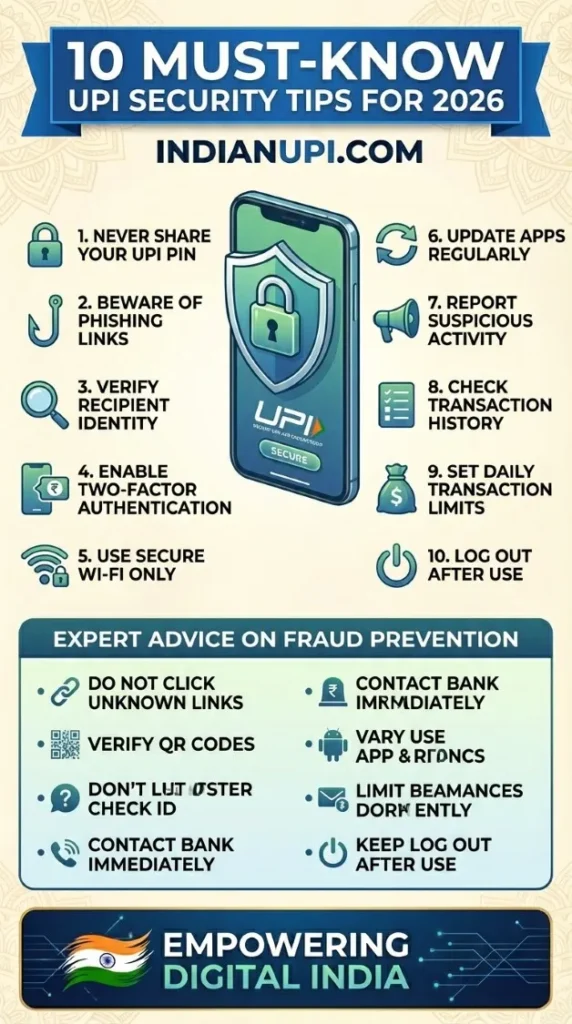
5 Security Best Practices You Must Follow
- Never share your UPI PIN with anyone - not even bank officials or customer care
- Don't click on payment links from unknown sources or suspicious messages
- Verify merchant names before scanning QR codes - fraudsters create fake QR stickers
- Enable app lock and biometric authentication for extra security
- Download UPI apps only from official Google Play Store or Apple App Store
Common Issues & Solutions: 12 Most Asked Questions Answered
Even the best technology faces hiccups. Here are the 12 most common UPI issues users face and their instant solutions:
1. Transaction Failed But Money Debited - What Now?
Don't panic! This happens due to network issues. The amount is auto-refunded within 1-3 business days (usually within 24 hours). Check your bank statement, not app balance. If not refunded in 3 days, raise a complaint with your bank using the UTR number.
2. UPI PIN Forgotten - How to Reset?
Open your UPI app → Go to Bank Account section → Select "Forgot UPI PIN" → Verify with last 6 digits of debit card + expiry date → Set new PIN. The entire process takes under 2 minutes and requires no bank visit.
3. Can I Use UPI Without Internet?
Yes! UPI works on USSD code *99# from any mobile phone, even feature phones without internet. Dial *99#, follow the menu to send money. Limited to basic transactions but extremely useful in emergencies.
4. What is "Transaction Pending" Status?
Pending means the transaction is being processed by banks. Wait 30 minutes. If still pending after 2 hours, it will auto-reverse. Check recipient's account - sometimes money reaches even when status shows pending due to app sync issues.
5. Sent Money to Wrong UPI ID - Can I Get It Back?
Unfortunately, UPI transactions are instant and irreversible. Immediately contact the recipient through their linked mobile number and request a refund. If they refuse, file a police complaint with transaction details. Always double-check UPI IDs before confirming.
6. Why Does My Bank Reject UPI Transactions?
Common reasons: Insufficient balance (check minimum balance requirement), daily limit exceeded (resets at midnight), incorrect UPI PIN (3 wrong attempts block your ID for 24 hours), or bank server maintenance (try after 30 minutes).
7. Can I Link Multiple Banks to One UPI ID?
Yes! Most UPI apps allow linking 4-10 bank accounts. Each bank gets a separate UPI ID (like name.bank1@app, name.bank2@app) or you can set one primary account and switch between accounts while paying. Check your specific UPI app's limit.
8. What Are UPI Transaction Charges in 2026?
Person-to-person (P2P) transfers are FREE. Merchant payments under ₹2,000 are FREE. Above ₹2,000, merchants may charge 0.5-1% (but most absorb this cost). Banks don't charge individuals for UPI usage. Check individual merchant policies for any convenience fees.
9. Is UPI Safe for Large Transactions?
Yes, with precautions. UPI has bank-level security with two-factor authentication. However, for amounts above ₹50,000, verify recipient identity through phone call, use known/trusted merchants only, and save transaction UTR immediately. For amounts above ₹1 lakh, consider NEFT/RTGS for added documentation.
10. How Long Do UPI Refunds Take?
Failed transactions: 1-3 business days (auto-reversed). Merchant refunds: 5-7 business days (depending on merchant's refund policy). Disputed transactions: Up to 45 days (requires bank investigation). Always save your transaction screenshot and UTR number.
11. Can I Use UPI on Multiple Devices?
No. UPI ID is device-locked for security. If you install the app on a new phone, you must re-verify your mobile number and re-link bank accounts. Old device's UPI access automatically deactivates. This prevents unauthorized access if your phone is stolen.
12. What is UPI Lite and When Should I Use It?
UPI Lite is for transactions up to ₹200 without entering PIN. You preload an "on-device wallet" (max ₹2,000) from your bank account. Perfect for frequent small payments like metro tickets, coffee, street food. Faster than regular UPI since it skips bank verification. Supported by select apps and banks - check your app for availability.
Getting Started with UPI: 4 Easy Steps for Beginners
Ready to join India's digital payment revolution? Here's your complete beginner's roadmap to start using UPI in under 10 minutes:
Download a UPI App
Choose from popular apps like Google Pay, PhonePe, Paytm, Amazon Pay, or your own bank's app. All UPI apps offer the same core functionality - choose based on UI preference or rewards programs. Download only from official app stores.
Link Your Bank Account
Open the app → Verify mobile number (must be registered with your bank) → Select your bank from the list → App auto-fetches linked accounts → Select account to link. No manual account number entry needed! The entire process is automated via SMS verification.
Set UPI PIN
For first-time setup, you'll need: (1) Debit card last 6 digits, (2) Card expiry date, (3) OTP sent to registered mobile. Create a 4-6 digit PIN you'll remember but others can't guess. Avoid birthdays or repeated digits like 1111. This PIN authorizes all future transactions.
Make Your First Transaction
Start with a small ₹10 transfer to yourself (between your own bank accounts) or a trusted friend. This tests your setup without risk. Once successful, you're ready for all UPI features: bill payments, merchant QR codes, money requests, and more!
Quick Tips for First-Time UPI Users
✅ DO
Choose a memorable UPI ID when prompted. Enable transaction notifications. Start with small amounts until comfortable. Save important transaction receipts. Update your app regularly for new features and security patches.
❌ DON'T
Share your UPI PIN with anyone. Accept payment requests from unknown numbers. Scan QR codes from unverified sources. Keep your app logged in on shared devices. Ignore failed transaction notifications.
Compatible Banks and Requirements
Minimum Requirements:
- Smartphone with internet connection (Android 5.0+ or iOS 10+)
- Active bank account with debit card
- Mobile number registered with your bank
- SMS permission for OTP verification
Over 400 Banks Support UPI:
All major banks including SBI, HDFC, ICICI, Axis, Kotak, Yes Bank, and 400+ others support UPI. Check the complete list of UPI-enabled banks on our website. Even small cooperative banks and payment banks now offer UPI services.
What Makes UPI Different from Other Payment Apps?
Many people confuse UPI with individual apps like Paytm or PhonePe. Here's the key distinction: UPI is the underlying technology (like the internet), while apps are just interfaces (like web browsers). You can switch apps anytime while keeping the same UPI functionality - your money stays in your bank account, not in any app's wallet.
Final Success Tip
The best way to master UPI is practice. Use it for your next grocery purchase, coffee, or auto-rickshaw ride. Within a week, you'll wonder how you ever managed without it. Over 300 million Indians made the switch - you're just getting started on the most convenient payment journey of your life!